A Virtual Private Server (VPS) in the USA is a virtual hosting environment created on a physical server located in the United States. It provides an independent operating system, allocated computing resources, and administrative control without requiring the customer to rent an entire physical machine.
Many VPS hosting providers use Kernel-based Virtual Machine (KVM) technology to create these environments. KVM allows multiple virtual machines to operate on a single physical server while maintaining separation between their operating systems and workloads.
Understanding how KVM virtualization works helps website owners, developers, and businesses choose hosting resources based on their applications' actual requirements.
What Is a Virtual Private Server in the USA?
A Virtual Private Server USA hosting service provides a virtual server hosted on infrastructure physically located in the United States. Each VPS operates as an independent environment with its own operating system, storage, memory allocation, and virtual processing resources.
Unlike traditional shared hosting, where customers typically work within a provider-managed environment, VPS hosting gives users greater control over server configurations.
For example, a developer can install application dependencies, configure a web server, manage databases, and adjust operating system settings without depending on the configuration of another customer's hosting account.
Businesses commonly use USA VPS hosting for websites, application development, databases, API services, and other workloads requiring server-level access.
The physical server's location also matters. Hosting applications in the USA may reduce network latency for users located in North America, although actual performance depends on routing, network connectivity, and the geographical distribution of visitors.
How Does KVM Virtualization Work?
KVM stands for Kernel-based Virtual Machine. It is an open-source virtualization technology built into the Linux kernel that allows a Linux host to run multiple independent virtual machines.
KVM uses hardware virtualization extensions supported by modern processors, including Intel VT-x and AMD-V.
A physical server running KVM can host several virtual machines, with each machine receiving its own virtual hardware configuration.
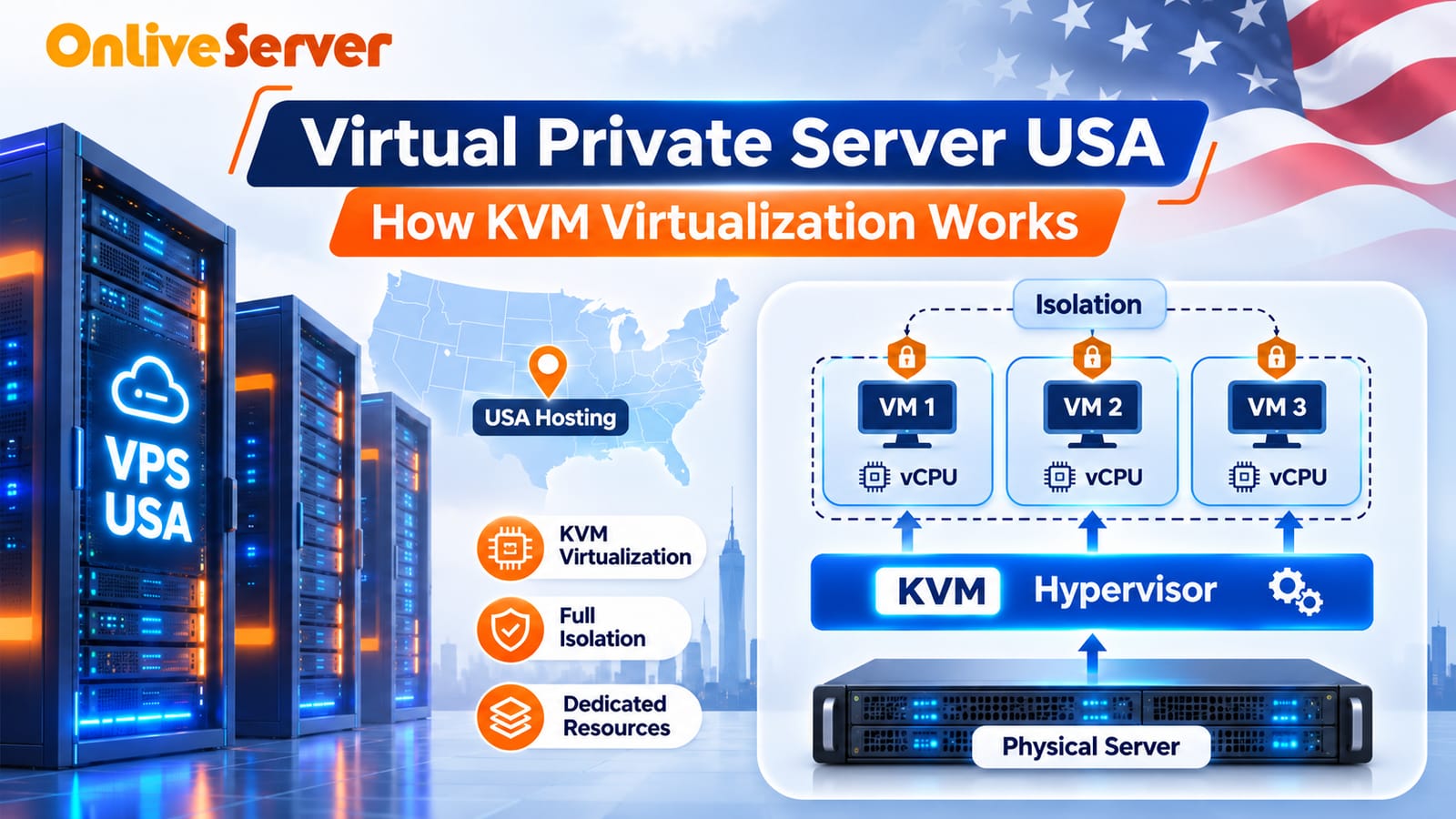
The virtualization process generally involves three components:
Physical server: Provides CPU capacity, physical memory, storage, and network connectivity.
KVM hypervisor: Uses Linux kernel virtualization capabilities to support and isolate virtual machines.
Guest virtual machines: Run their own operating systems and applications using virtualized resources.
KVM commonly works with QEMU, which provides virtual hardware and device emulation, while management tools can handle machine creation, configuration, and monitoring.
This arrangement allows multiple customers to use the same underlying server hardware without sharing a single guest operating system.
Understanding the Role of a Hypervisor
A hypervisor is the software layer responsible for enabling virtual machines to use physical computing resources.
In a KVM environment, the Linux kernel supplies the core virtualization functionality, while supporting software manages virtual machine execution and devices.
Consider a physical server with substantial memory and processing capacity. Instead of assigning all its resources to one application, an administrator can create multiple VPS instances.
Each virtual machine can run a separate operating system, maintain its own files, and support different applications.
For example, one VPS might host a business website, another could run a database service, and a third could serve as a development environment.
The hypervisor helps maintain isolation between these environments while coordinating their access to the physical hardware.
What Is vCPU, RAM, and Storage in KVM VPS Hosting?
Three important specifications to understand before purchasing a VPS are virtual CPUs, memory, and storage.
Virtual CPU (vCPU)
A vCPU is a virtual processor presented to a guest operating system. The hypervisor schedules its execution on the host's physical CPU resources.
For example, a VPS configured with four vCPUs can schedule multiple processing tasks, but this does not automatically mean the customer owns four dedicated physical CPU cores.
Some hosting providers allocate dedicated CPU resources, while others use shared scheduling arrangements.
Performance depends on the processor, workload, resource allocation, and how heavily the physical host is utilized.
Random Access Memory (RAM)
RAM temporarily stores the data actively used by the operating system and running applications.
A VPS with sufficient memory can handle application processes, database operations, and caching more effectively.
KVM supports virtual machine memory allocation, although providers may use different policies for reservation and overcommitment.
Customers should therefore review whether the advertised memory is guaranteed and how the provider manages resource contention.
Virtual Storage
Virtual storage provides the disk space used by the VPS operating system, application files, databases, and other data.
Providers may use SSD or NVMe-backed storage, depending on their infrastructure.
Storage performance is influenced by the underlying hardware, available I/O capacity, virtualization configuration, and competing workloads.
A larger storage allocation does not necessarily mean faster storage performance.
How Does KVM Provide Resource Isolation?
Resource isolation is one of the main reasons businesses choose KVM-based VPS hosting.
Each KVM virtual machine runs its own guest operating system with a separate kernel and virtualized hardware environment.
This separation prevents ordinary processes inside one virtual machine from directly accessing another virtual machine's memory or operating system.
For example, if an application crashes inside one VPS, it does not normally cause applications running inside another VPS to crash.
KVM also allows administrators to configure resource limits and scheduling policies.
However, isolation should not be confused with guaranteed performance or complete protection against security vulnerabilities.
Virtual machines still depend on shared physical hardware, and resource contention can affect performance when hosts are oversubscribed. Hypervisor security updates, access controls, and guest operating system maintenance remain important.
KVM VPS Hosting vs Shared Hosting
Although both hosting models can run websites, they offer different levels of control and management responsibility.
Feature
KVM VPS Hosting
Shared Hosting
Operating system
Independent guest OS
Provider-managed environment
Administrative access
Root or administrator access commonly available
Usually limited
Resource allocation
Configurable virtual resources
Plan-dependent shared resources
Software installation
Greater flexibility
Provider restrictions
Server management
Customer or managed provider
Mostly hosting provider
Suitable workloads
APIs, applications, configurable web stacks
Standard websites and blogs
Shared hosting may be sufficient for a small website that requires minimal server administration.
KVM VPS hosting becomes more useful when applications need custom software, independent operating system configurations, or greater control over server resources.
Why Choose a USA-Based KVM VPS?
A USA-based virtual private server can be useful for organizations serving customers in the United States and neighboring regions.
Developers may also prefer an American hosting location when their applications communicate frequently with services or infrastructure located in the USA.
Common use cases include e-commerce websites, content management systems, application backends, development servers, and database hosting.
Businesses evaluating a Virtual Private Server USA solution from OnliveServer can compare available server configurations against their expected CPU, memory, storage, and bandwidth requirements.
Before selecting any provider, it is worth confirming the actual server location, virtualization technology, backup availability, network capacity, support arrangements, and resource allocation policies.
Important Factors Before Selecting a KVM VPS
Choosing a VPS based only on the number of vCPUs or the advertised storage capacity can lead to disappointing results.
Administrators should first estimate their workload's actual resource consumption.
A lightweight website may require relatively little CPU capacity, while a database application handling frequent queries may need more memory and consistent disk performance.
Security responsibilities should also be understood. VPS customers generally need to maintain operating system updates, configure firewalls, protect administrative credentials, and monitor running services unless these tasks are included in a managed hosting agreement.
Regular backups are essential, especially for production databases and business applications.
Finally, businesses should assess whether the provider allows resource upgrades as application requirements increase.
Conclusion
A Virtual Private Server in the USA offers an independent hosting environment on physical infrastructure located in the United States. It is suitable for websites and applications that need more operating system control than standard shared hosting typically provides.
KVM virtualization makes this possible by running separate virtual machines on shared physical hardware. Its architecture supports independent operating systems, configurable virtual resources, and workload isolation.
Understanding how hypervisors, vCPUs, memory allocation, and storage work makes VPS selection easier. The right configuration depends on application requirements, expected traffic, operational responsibilities, and the provider's resource management practices.
For businesses and developers considering USA VPS hosting, evaluating these technical details is more useful than relying on advertised specifications alone.