Non-emergency medical transportation (NEMT) providers may receive trip requests through phone calls, facility portals, website forms, broker files, and other channels. The requests often describe the same kind of service, but the information can arrive in different formats. One source may supply a complete pickup address and a confirmed arrival deadline. Another may include only a street name and a general appointment time.
A NEMT booking data validation process checks whether a request has enough reliable information to become a workable transportation assignment. The goal is not to reject unusual trips. It is to identify questions early and send them to the person best positioned to answer them.
Here are eight checks that a transportation team can apply before moving a new request onto its dispatch schedule.
1. Record Where the Request Came From
Every incoming booking should have a recognizable source. It might be a phone call handled by staff, a facility portal request, a broker manifest, or a website form.
Record the booking channel and, where appropriate, an external reference number. The reference allows the team to compare a later correction against the original request. For example, if a facility updates a pickup location by phone after submitting its initial booking online, the dispatcher can identify which trip record needs changing.
A source field also helps teams find recurring data-quality issues. If incomplete return-trip instructions regularly arrive through one channel, the provider can improve the instructions given to that source.
2. Validate Service Dates and Times
A trip request can contain several different times: the requested pickup, a facility check-in deadline, the medical appointment, and an anticipated return pickup.
These should be stored as distinct fields rather than collapsed into one generic time entry. A useful booking review asks which time is confirmed, which is estimated, and whether the pickup window leaves enough room for boarding and travel.
Providers that receive data from systems in different locations should also check local time-zone handling and daylight-saving transitions. A value copied from a file should not silently shift the date or pickup hour.
If essential timing is unclear, mark the request for clarification before assigning a vehicle.
3. Check Pickup and Destination Details
A location should include enough information for a driver to find the correct stop. In many cases, a street address and postal code are only the starting point.
For large hospitals, a driver may need a specific building entrance, department, loading zone, or patient discharge area. Residential pickups may require a gate code or an agreed meeting point, shared only with authorized staff.
Check for mismatches between a facility name and its selected street address. If mapping or address suggestions are used, the dispatcher should still be able to confirm the correct location with the requester.
4. Verify Mobility and Vehicle Requirements
Passenger transportation needs affect which vehicles can safely serve a trip. An incomplete mobility field can make a booking look ready even when it is not.
The intake process should capture the information needed to identify an appropriate vehicle and boarding arrangement. A wheelchair-accessible request, for instance, may require an available accessible vehicle and an appropriate securement configuration.
Use conditional questions instead of forcing every requester to complete unrelated fields. Ask for the additional information only when the selected transportation type makes it relevant. Do not collect medical information that staff do not need for coordinating the service.
5. Detect Possible Duplicate Requests
Duplicate requests are possible when a facility submits a booking online and later calls the dispatch office to check it. A broker's updated file can also include reservations already present in the schedule.
A duplicate check can compare an authorized trip reference, passenger identifier, service date, pickup location, destination, and time window. It should flag suspicious matches for review rather than automatically deleting them: two legitimate trips may share several details.
The person reviewing a possible duplicate should decide whether it is a new booking, a correction, a return leg, or an existing reservation. Keep the decision in the trip history so another dispatcher can understand it later.
6. Confirm the Payer or Contract Context
Not all transportation requests follow identical administrative rules. A booking may come from a broker, healthcare facility, or private-pay customer.
The intake record should make the relevant payer or contract context clear. When the applicable agreement requires authorization, a service classification, or other specific information before transportation can be accepted, the booking workflow should identify what is missing.
This check does not replace billing review. It reduces the chance that dispatch receives a request whose basic administrative requirements have not been established.
7. Use a Clear Needs Review State
Some booking systems treat a request as either present or absent. A more useful workflow separates Received, Needs Review, Ready for Dispatch, and Cancelled or Declined as appropriate to the provider's procedures.
The specific labels can vary, but their meaning should be consistent. For example, a trip missing a confirmed pickup entrance might remain in Needs Review while staff contact the facility. That prevents the trip from being mistaken for a fully confirmed assignment.
A review state should show what needs attention and who is responsible for resolving it. Avoid burying critical questions in a long, unstructured notes field.
8. Preserve Changes Without Re-Entering the Trip
A corrected request should normally update the appropriate existing trip record, rather than create another reservation from scratch.
Retain a history of material changes such as pickup times, addresses, mobility requirements, and assignment decisions. Where appropriate, record when the update was received and whether the assigned driver was notified.
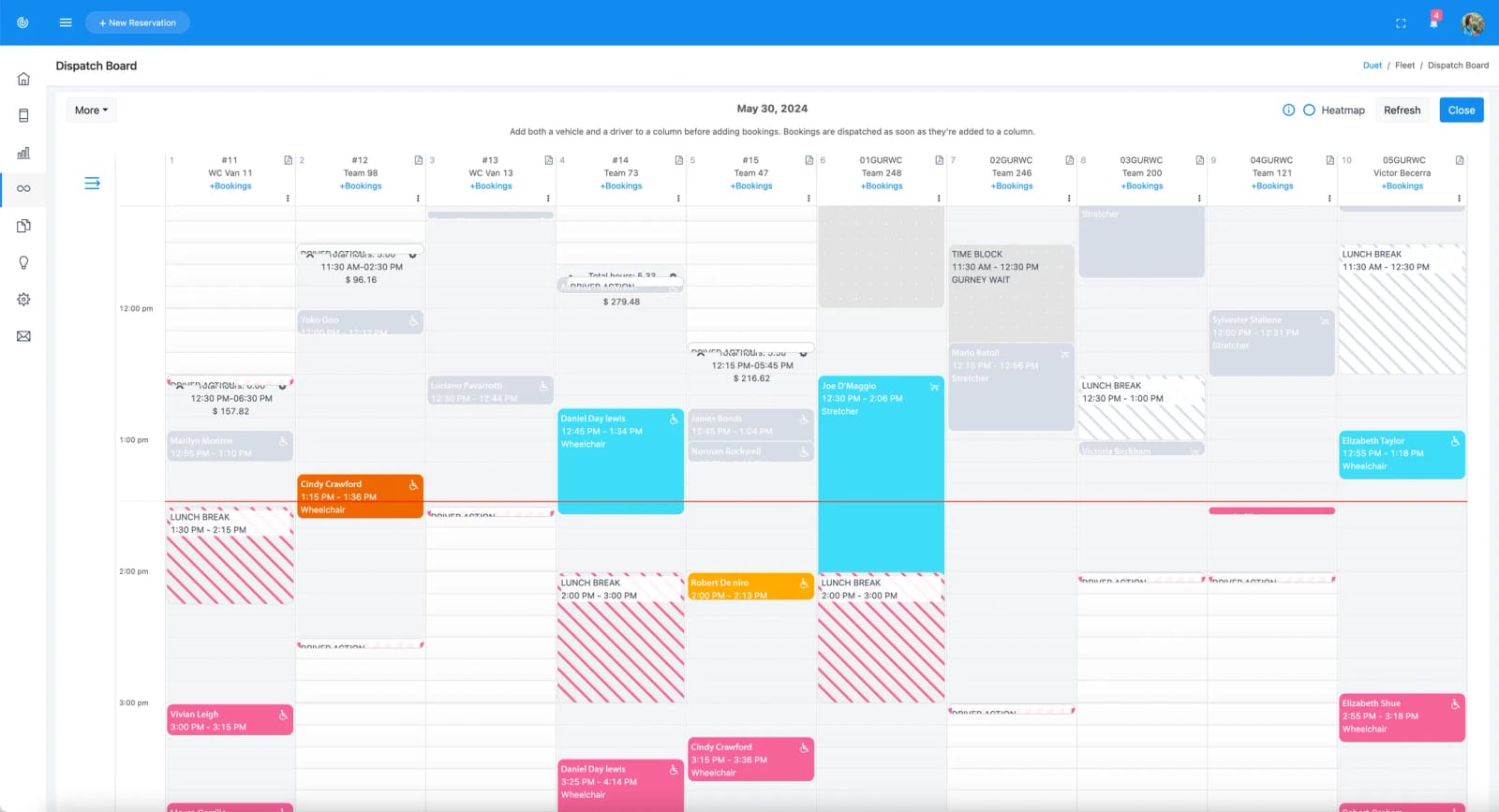
For a practical example of centralized multichannel booking, Duet NEMT booking software describes how phone, web, facility, email, and broker requests can be organized on a common dispatch board. The broader principle is simple: the trip that dispatchers work from should reflect the latest confirmed booking information.
Example: Applying a Booking Readiness Checklist
Consider a fictional request arriving from a rehabilitation center for a 2:00 PM appointment. The initial submission includes a passenger reference, the facility name, a pickup street address, and a request for wheelchair-accessible transportation. It does not specify the pickup entrance or whether 2:00 PM is the appointment time or the required arrival time.
Instead of assigning a driver immediately, the dispatcher places the request in Needs Review. The team confirms the entrance, the facility's required arrival time, and the appropriate vehicle requirements. After checking for an existing reservation, the dispatcher updates the request and marks it Ready for Dispatch.
The process adds a small amount of verification before assignment, but prevents downstream uncertainty about timing and location.
How to Measure Whether Validation Is Helping
Start with a short weekly review rather than a complicated performance program. Useful measures include the number of bookings sent back for clarification, duplicate requests caught before dispatch, assignments changed because of missing location information, and requests that reached dispatch without an essential field.
Interpret these measures carefully. A rise in detected incomplete bookings may initially indicate that the validation process is finding problems that previously went unnoticed. Over time, patterns can reveal which booking sources or staff procedures need improvement.
Conclusion
Good booking data is not just an administrative convenience. It helps drivers receive usable instructions and gives dispatchers a more reliable starting point for planning transportation.
By checking sources, dates, locations, mobility needs, duplicate requests, contract context, and change history, providers can establish a clear definition of a trip that is ready for dispatch. The best checklist is one that staff can apply consistently without creating unnecessary barriers to legitimate transportation requests.
Prepared for Duet NEMT. Duet was founded in 2020 by James O'Donnell and Jing Zhu.