Choosing between Windows and Linux VPS hosting for an enterprise database involves more than comparing operating systems. The database engine, application compatibility, memory allocation, licensing terms, and maintenance requirements all affect the final decision.
Microsoft SQL Server is a common choice for business applications built around T-SQL, Microsoft technologies, and established enterprise workflows. PostgreSQL and MySQL offer open-source alternatives that support transactional applications without commercial database licensing fees.
For most new applications without Microsoft-specific dependencies, PostgreSQL on a Linux VPS is a strong starting point. SQL Server remains valuable when an existing ERP, CRM, or accounting system depends on its features and compatibility.
Windows vs Linux VPS for Database Hosting
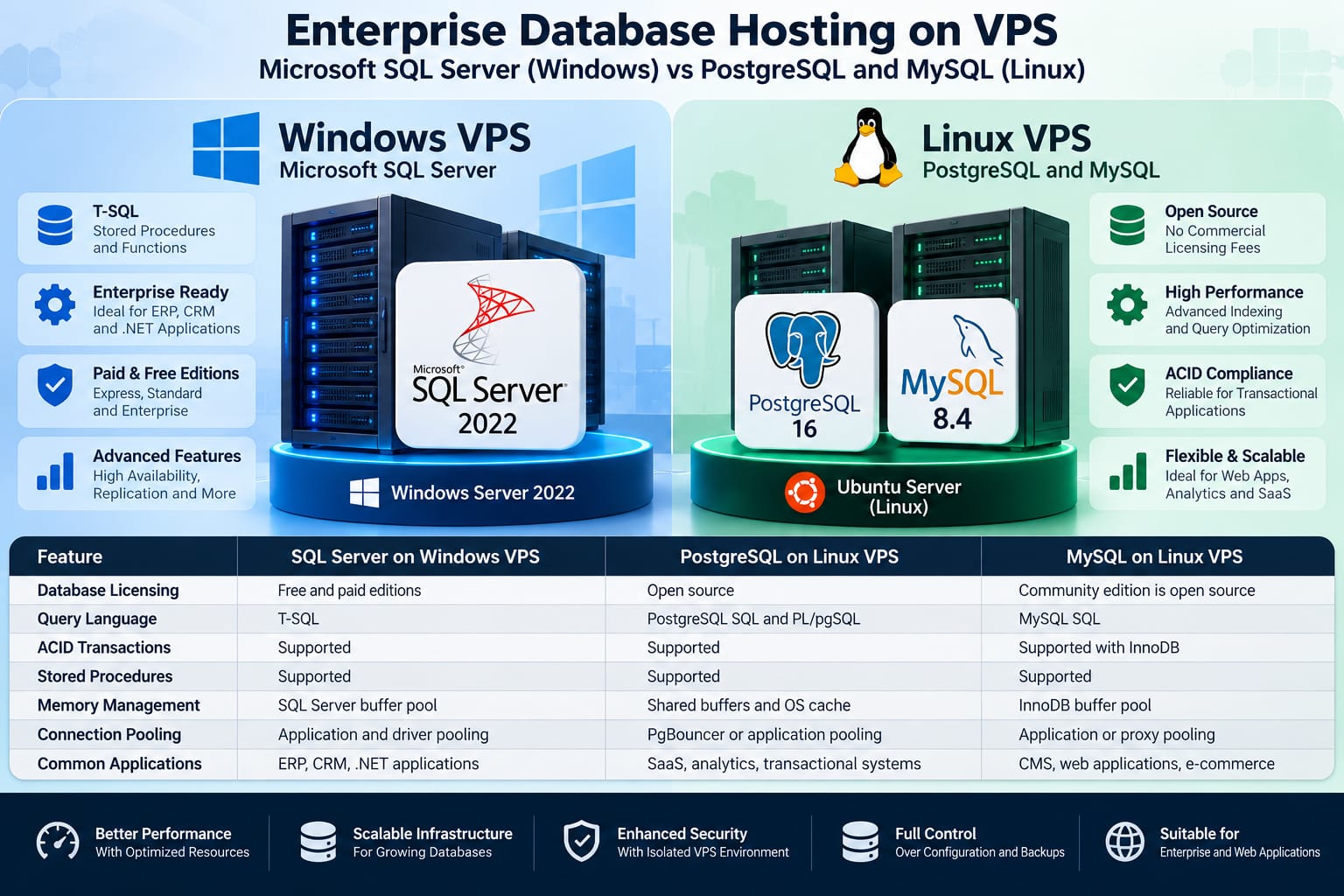
A Virtual Private Server (VPS) provides dedicated resources for running databases. Choosing between Windows and Linux VPS depends on application compatibility, performance requirements, and licensing costs.
Microsoft SQL Server on Windows VPS is suitable for ERP, CRM, and .NET applications. It supports T-SQL, stored procedures, ACID transactions, and buffer pool memory management. Both free and paid editions are available.
PostgreSQL on Linux VPS is an open-source database commonly used for SaaS, analytics, and transactional applications. It supports advanced SQL features, ACID transactions, and connection pooling through tools such as PgBouncer.
MySQL on Linux VPS is widely used for websites, CMS platforms, and e-commerce applications. Its InnoDB engine supports ACID transactions, indexing, and buffer pool caching.
All three engines can support demanding production workloads. Actual performance depends on query design, indexing, concurrency, storage latency, and available resources.
For a broader operating system comparison, read this Windows vs Linux VPS hosting guide.
Microsoft SQL Server on Windows VPS
Microsoft SQL Server provides a relational database platform commonly used by organizations running applications developed around the Microsoft ecosystem.
SQL Server 2022 supports transactional processing, stored procedures, indexing, execution plan analysis, and high-availability capabilities that vary by edition.
T-SQL and Application Compatibility
Transact-SQL extends standard SQL with procedural programming features, variables, error handling, and database-specific functions.
Applications built around SQL Server may depend on:
T-SQL stored procedures and functions
SQL Server Agent jobs
SQL Server-specific data types
Microsoft database administration tools
Existing backup and recovery procedures
Migrating these applications to PostgreSQL can require changes to SQL queries, stored procedures, drivers, and application logic.
For an established enterprise application, maintaining SQL Server may therefore cost less than rewriting and validating its database layer.
SQL Server Memory Management
SQL Server uses a buffer pool to cache frequently accessed database pages and reduce physical disk reads.
Administrators should configure memory limits while leaving sufficient RAM for the operating system, backup utilities, and other services.
A database VPS with insufficient memory may experience additional disk reads, reduced query throughput, and increased response times.
Performance analysis should include buffer usage, memory grants, query execution plans, and storage latency rather than relying only on overall RAM consumption.
PostgreSQL on Linux VPS
PostgreSQL is an open-source relational database known for transactional reliability, extensibility, advanced indexing, and support for complex SQL queries.
It is suitable for applications requiring structured data, concurrent transactions, reporting, and flexible database design.
PostgreSQL Performance and Indexing
PostgreSQL supports several index types, including B-tree, GIN, GiST, and BRIN. Each serves different query patterns.
B-tree indexes work well for common equality and range comparisons. GIN indexes can help with appropriate JSONB, array, and full-text search workloads.
Creating an index does not automatically improve every query. Additional indexes consume storage and increase maintenance work during inserts, updates, and deletes.
Administrators can examine execution plans using:
EXPLAIN (ANALYZE, BUFFERS)
SELECT *
FROM orders
WHERE customer_id = 1001;
This command executes the query and reports actual execution information, including buffer activity.
Because it runs the statement, use care when applying EXPLAIN ANALYZE to data-changing queries.
PostgreSQL VACUUM and Database Maintenance
PostgreSQL uses Multi-Version Concurrency Control (MVCC) to manage concurrent transactions.
When rows are updated or deleted, obsolete row versions may remain until cleanup occurs.
The VACUUM process reclaims space for reuse and helps maintain database health. PostgreSQL includes autovacuum to automate routine cleanup.
For production VPS environments, administrators should monitor dead tuples, long-running transactions, table growth, and autovacuum activity.
Disabling autovacuum to reduce short-term resource usage can create larger maintenance problems later.
Connection Pooling with PgBouncer
Each PostgreSQL connection uses server resources. Applications that create excessive connections can increase memory consumption and reduce efficiency.
PgBouncer is a lightweight connection pooler that allows applications to reuse database connections.
It is especially useful for web applications with frequent short-lived database requests.
Transaction pooling can reduce the number of backend connections required, but applications must be compatible with its session-state restrictions.
MySQL on Linux VPS
MySQL is another established option for web applications, content management systems, and transactional workloads.
MySQL 8.4 uses InnoDB as its default storage engine, providing transaction support, row-level locking, crash recovery, and ACID properties.
InnoDB Buffer Pool Optimization
The InnoDB buffer pool stores frequently accessed data and index pages in memory.
On a dedicated database VPS, administrators can allocate a substantial portion of available memory to the buffer pool, provided sufficient RAM remains for other database operations and the operating system.
There is no universally correct buffer pool percentage.
A suitable configuration depends on the server's RAM, workload, connection count, and whether other applications share the VPS.
MySQL's slow query log and execution plan tools help identify expensive queries before administrators increase hardware resources.
SQL Server Licensing vs Open-Source Database Costs
Licensing is one of the clearest differences between SQL Server and PostgreSQL or MySQL.
PostgreSQL and MySQL Community Edition do not require commercial database license purchases.
SQL Server offers both free and paid editions, with different resource limits and supported capabilities.
SQL Server 2022 Express Limitations
SQL Server 2022 Express is free to use, but its Database Engine has several important limits:
Resource
SQL Server 2022 Express Limit
Maximum relational database size
10 GB per database
Maximum compute capacity
Lesser of 1 socket or 4 cores
Maximum buffer pool memory
1,410 MB per instance
These limits apply to the SQL Server 2022 Express edition, not every SQL Server edition.
For applications requiring larger databases or additional capabilities, SQL Server Standard or Enterprise may be appropriate.
Commercial licensing costs depend on the edition, licensing agreement, virtualization arrangements, and deployment model. Organizations should confirm their licensing requirements before purchasing VPS resources.
Total Cost of Ownership
A realistic hosting cost comparison includes more than database licensing.
Consider:
VPS CPU, RAM, and storage requirements
Operating system licensing
Database licensing and support subscriptions
Backup storage and disaster recovery
Database administration and maintenance
Monitoring, security, and patch management
Application migration and staff training
A Linux VPS running PostgreSQL may reduce software licensing expenditure, but it still requires qualified administration.
Similarly, an existing SQL Server application may be more economical to maintain than migrate if the migration introduces significant development and testing costs.
Can Microsoft SQL Server Run on Linux VPS?
Yes. Microsoft supports SQL Server on selected Linux distributions, including supported versions of Ubuntu, Red Hat Enterprise Linux, and SUSE Linux Enterprise Server, depending on the SQL Server release.
SQL Server 2022 can run on a supported Linux VPS without requiring Windows Server.
This creates a third deployment option:
Microsoft SQL Server on Linux VPS.
Organizations can retain their SQL Server database engine while using a Linux operating system.
However, running SQL Server on Linux does not automatically eliminate SQL Server licensing costs. Some Windows-specific integrations and features may also require compatibility checks.
Before migration, verify operating system support, SQL Server edition requirements, application dependencies, and operational tooling.
Database Performance Under High Concurrency
Comparing database performance requires a controlled workload.
A PostgreSQL server with well-designed indexes can outperform a poorly configured SQL Server installation for a particular query. The reverse can also occur.
Performance depends on the database workload rather than the product name alone.
Important Performance Factors
1. Query execution plans
Execution plans reveal how the database retrieves and joins records. Table scans, expensive joins, and inaccurate estimates can increase execution time.
2. Memory allocation
Insufficient memory can increase disk activity. Excessive allocation can leave too little memory for the operating system and other processes.
3. Storage performance
Database workloads often depend on random read/write latency, transaction log performance, and storage consistency.
NVMe-backed VPS storage can be useful, but the actual benefit depends on the provider's storage architecture and workload.
4. Connection management
Connection pooling can reduce connection creation overhead and control resource usage during traffic spikes.
5. Transaction design
Long-running transactions, lock contention, and unnecessary updates can reduce concurrency even when CPU and RAM are available.
For meaningful testing, compare equivalent datasets, representative queries, concurrency levels, and measured latency percentiles.
Without controlled benchmark results, declaring one database universally faster would be misleading.
Choosing VPS Resources for Database Hosting
The appropriate VPS configuration depends on database size, active connections, query complexity, and workload growth.
A small development database may operate comfortably on modest resources. A production ERP system with frequent transactions and reporting queries may require considerably more memory and CPU capacity.
Before selecting a VPS, estimate the working dataset, expected peak connections, storage growth, backup requirements, and recovery objectives.
For organizations comparing available infrastructure options, this VPS server hosting page provides a starting point for reviewing hosting resources.
Avoid choosing a plan based only on the advertised number of CPU cores. Consistent storage performance, available memory, and operational control matter just as much.
Security and Backup Requirements
Database security should remain a priority regardless of the operating system.
Production databases should generally use private network connectivity or tightly restricted access rules rather than exposing database ports to the public internet.
Use encrypted connections where appropriate, separate application accounts, and grant only the permissions each service requires.
Backups also need regular testing.
A backup file that has never been restored successfully is not sufficient evidence of recoverability.
For business-critical systems, define recovery point objectives (RPO) and recovery time objectives (RTO), then select backup frequency and recovery architecture accordingly.
High availability and backups solve different problems. Replication may improve service continuity, but it can also replicate accidental deletions or unwanted data changes.
Which Database Hosting Platform Should You Choose?
· Choose SQL Server on Windows VPS when the application depends on Windows-specific components, Microsoft integrations, or established SQL Server administration workflows.
· Choose PostgreSQL on Linux VPS for new transactional applications that benefit from advanced SQL capabilities, extensibility, and open-source licensing.
· Choose MySQL on Linux VPS when the application is built for MySQL, particularly with common web platforms and existing MySQL-based development workflows.
· Consider SQL Server on Linux VPS when you want to retain SQL Server compatibility but do not require Windows-specific features.
For Philippine software vendors maintaining ERP, CRM, and accounting applications, compatibility and ongoing support costs are especially important. Existing SQL Server applications may justify retaining the Microsoft stack, while new systems can evaluate PostgreSQL or MySQL based on their actual requirements.
The best choice is the platform that meets the application's functional requirements, operational capabilities, and long-term budget.
Frequently Asked Questions
Is PostgreSQL cheaper than Microsoft SQL Server?
PostgreSQL has no commercial database licensing fee. SQL Server also offers free editions, but paid editions may introduce licensing costs. Total hosting costs still depend on infrastructure, administration, and support.
Can SQL Server run efficiently on a Linux VPS?
Yes. SQL Server supports selected Linux distributions and can run production workloads on supported Linux VPS configurations. Performance depends on available resources, workload tuning, and compatibility.
Is PostgreSQL better than MySQL for enterprise applications?
Neither is universally better. PostgreSQL offers advanced SQL capabilities and extensibility, while MySQL is widely used in web applications. Application requirements should determine the choice.
How much RAM does a database VPS need?
There is no fixed requirement for every database. RAM needs depend on the active dataset, connections, query operations, database engine, and other services running on the server.
Should I migrate an existing SQL Server database to PostgreSQL?
Migration can reduce licensing expenses, but it may require rewriting T-SQL procedures, changing application queries, and testing database behavior. Evaluate migration effort against expected long-term savings before proceeding.
Wrapping Up
Choosing between Microsoft SQL Server on Windows VPS and PostgreSQL or MySQL on Linux VPS depends on your application's requirements, database workload, and long-term hosting budget.
SQL Server is a practical choice for businesses relying on Microsoft technologies, T-SQL, and existing enterprise applications. PostgreSQL offers advanced database features without commercial licensing fees, while MySQL remains a reliable option for web applications and e-commerce platforms.
Before making a decision, evaluate database compatibility, memory requirements, query performance, licensing costs, and maintenance responsibilities. A properly configured VPS with sufficient resources and regular backups matters more than the operating system alone.