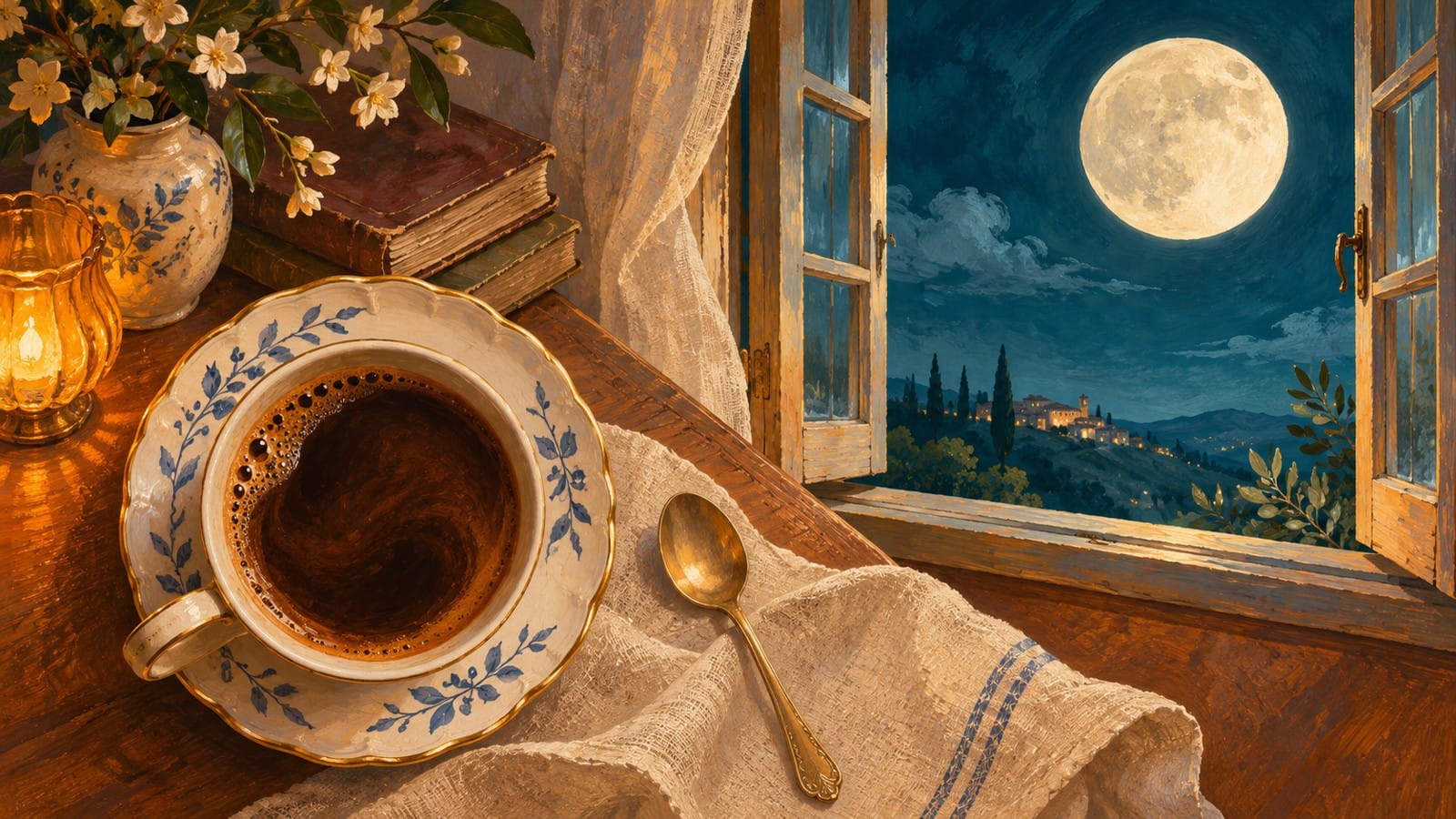
A cup of coffee can become the opening of a night scene without a character walking anywhere. The connection is already visible: the round surface of the drink and the round face of the moon. Give those shapes a similar place in the frame, and you have a specific idea to try instead of asking vaguely for a “cinematic transition.”
This exercise starts with two stills, one copy-ready motion prompt and a modest goal: explore a five-second bridge between an everyday object and an imagined landscape. The interesting part is the change of scene around a familiar shape.
Opening-image idea: the coffee surface supplies a circular anchor. This prepared illustration is not a frame from a generated video.
Choose the circle that carries the transition
Use an overhead image of a cup containing dark coffee as the first image. Use a full moon against a quiet sky as the last. Your visual anchor is the coffee surface, not the outer edge of a large saucer. That distinction matters when you compare the two pictures: lining up a saucer with the moon would leave the actual drink much smaller.
Decide what kind of connection you want before writing the prompt. Here the request is a dreamlike scene transition: warm wood and porcelain give way to night sky while one circular area remains visually central. It is an artistic interpretation, not footage showing coffee physically turning into a moon. A hard match cut would be a different treatment, with an abrupt change between two shots.
The opening and closing illustrations here are separate starting ideas. They still need a framing pass if you want a precise match. A pleasing picture on its own is not necessarily a compatible endpoint.
Prepare two separate frames on the same canvas
Make a 16:9 project in an image editor you already use. Place each still on its own canvas of the same dimensions. A convenient preparation size is 1600 by 900 pixels; that is an editing choice, not a promise that a free generation will retain that resolution.
Place the coffee circle. Put the center of the visible liquid near the center of the canvas. Keep enough of the cup to establish that the opening is coffee rather than an abstract disc.
Place the moon. On the second canvas, place the moon center at the same coordinates. Resize the picture until the moon diameter roughly matches the visible coffee surface. Use the liquid boundary as your guide, not the handle or rim.
Compare with a temporary overlay. Put the images on separate layers in the same editor and lower the top layer's opacity. Check whether the circular centers and diameters approximately coincide. Adjust position and scale there; this is image preparation outside the generator.
Export clean endpoints. Export each image separately as JPEG, PNG or WebP. Do not upload a comparison board, layer controls, alignment grid or the two images joined together as one input.
Do not stretch one picture horizontally just to force its circle to fit. Keep the image proportions, reposition and crop the surrounding scene, or choose a better source. If the moon cannot reach the intended size without an awkward crop, simplify the composition before attempting motion.
A handle and spoon may be useful opening details, but they also have to disappear as the scene changes. Keep them secondary. Extra hands, moving steam, lettering and several competing circles would add more things for the requested transition to resolve.
Closing-image idea: a moon replaces the coffee circle as the destination. Align its position and apparent size with the opening before trying the prompt.
Copy a prompt that describes the bridge
The two images define the destinations. The prompt supplies the intended relationship between them. It cannot turn the request into a deterministic edit, so describe the idea clearly without treating “keep” as a guaranteed lock.
Create a dreamlike five-second transition from the supplied opening image of an overhead cup of dark coffee to the supplied closing image of a full moon above distant mountains. Keep the central circular anchor in approximately the same position and at a similar apparent size throughout the transition. Begin with the warm tabletop scene, gradually let the surrounding wood and porcelain give way to the deep teal night sky, and resolve the dark coffee circle into the pale moon at the end. Let the change of scene be the main action. Use steady framing without an added pan, zoom or camera orbit. Avoid extra moons, new cups, lettering, hands or additional objects. Aim for a clear connection between the two scenes rather than liquid spilling or the cup melting. Finish on the supplied moon composition.
The timing is a creative direction: establish coffee, change the surrounding scene, arrive at the moon. It does not specify exact keyframes or guarantee a particular intermediate frame. The dark-to-light change of the circular area is intentional; unwanted wobbling of its boundary is a separate issue to watch for.
To adapt the idea, replace the two named subjects and surroundings while keeping one recognizable shape. A round ceiling lamp and a sun might provide another pair. Changing the central geometry, camera angle and scene all at once would make the shared anchor less clear. For this first attempt, keep the coffee and moon pair until you know whether the connection reads.
Try the two-image route in VO4 AI
The VO4 AI free image-to-video generator is an option for trying this prepared pair. Its official free page describes a five-second, 480p output at zero credits, without creating an account. It also requires verification, and free requests may queue. Those are the page's stated conditions, not results measured in this guide.
Choose the image-guided route and provide the coffee image first, then the moon image as the last frame. Paste the motion prompt and select 16:9 to match the prepared canvases. Complete verification before submitting. Keep the original image files separately so you can return to the preparation step if needed.
This is a request made through a general frame-guided workflow. No dedicated coffee-to-moon effect, native match-cut filter or exact geometric tracking control has been verified here. The images and words guide a possible interpretation; they do not prescribe every pixel between the endpoints.
When a candidate is ready, preview it before downloading. Save a useful clip yourself: the page describes task history as local to that page and browser, so it should not be treated as a separate cloud project archive.
A planning illustration of the two-scene relationship. The pictured prints are not a measured alignment overlay or model input file.
Keep the connection, change the method if needed
Watch the entire candidate once at normal speed. Then inspect the beginning, middle and end with three questions:
Can you identify the opening as coffee and the ending as a moon without an explanatory title?
Does the circular anchor remain easy to follow, or does an unexpected movement pull the eye elsewhere?
Does the change feel like an intentional passage between scenes, or does it mainly look like porcelain melting?
If the circle jumps sideways, return to the still-image overlay and correct the centers before adding more prompt adjectives. If the composition is already aligned but the transition introduces an unwanted orbit, keep the same inputs and simplify the movement wording. Neither adjustment guarantees the next outcome; each gives you a more specific request to evaluate.
You can also decide that the image pair is stronger than the generated passage. In an external video editor, place the two stills in sequence and use a straight cut, or a short crossfade if it serves the idea. Align the circular features in that editor as well. This fallback is a separate editing method, not a feature attributed to the free generator, and it need not use a generated clip at all.
The finished creative decision is the connection between coffee and night. A five-second AI interpretation is one way to explore it. Two carefully framed stills and a deliberate cut can express the same idea with a different rhythm.