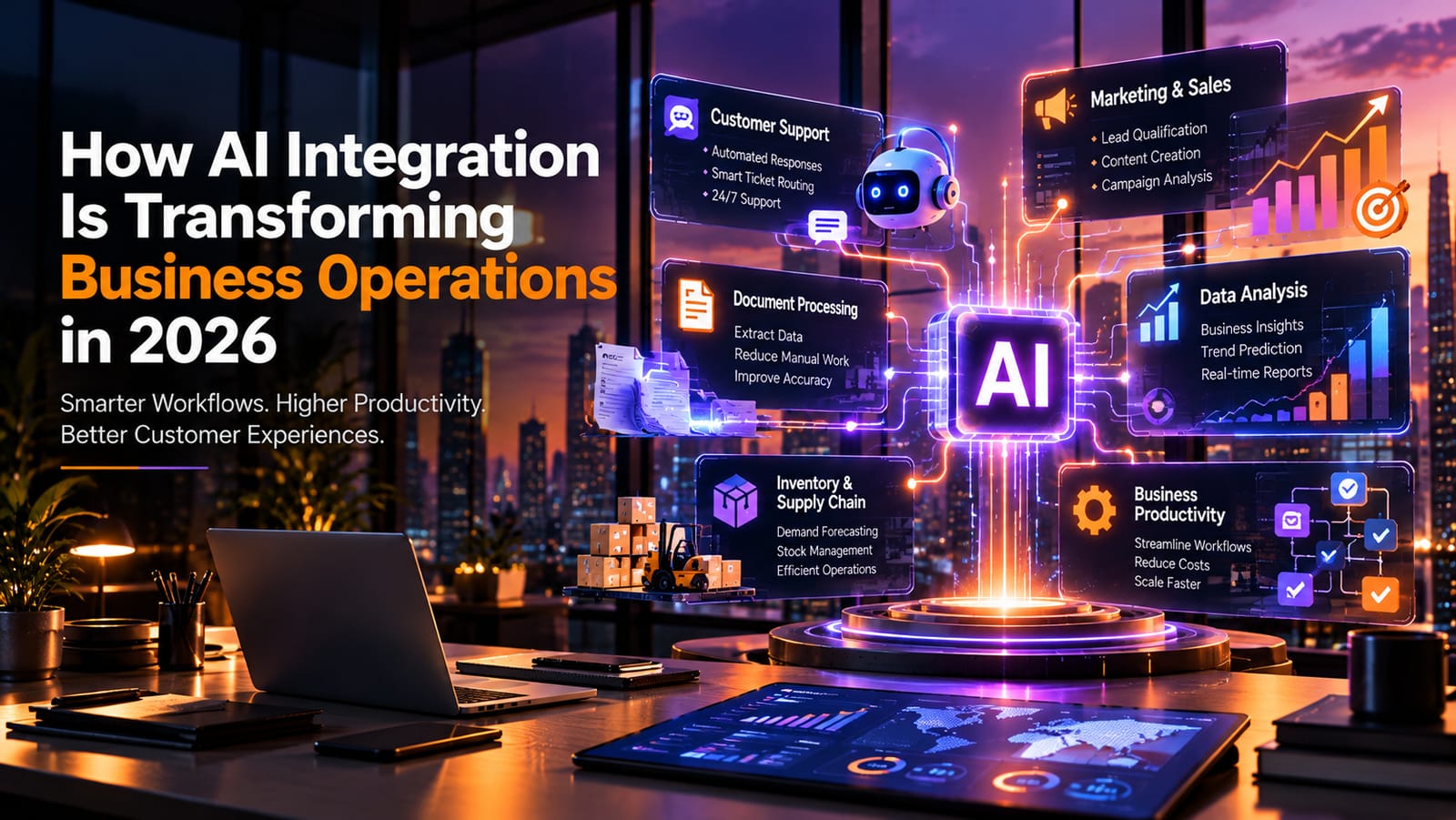
Why Businesses Are Integrating AI in 2026
Artificial intelligence has moved beyond experimentation. Businesses are increasingly exploring how to integrate AI into everyday operations, from customer service and marketing to finance, inventory management, and internal workflows.
But adopting AI is not simply about adding a chatbot to a website or using an AI writing tool. The real opportunity lies in connecting AI capabilities with existing business systems, company data, and operational processes.
For example, an e-commerce business can use AI to forecast demand, recommend products, automate customer inquiries, and identify unusual purchasing patterns. A service company can use AI to organize leads, summarize customer conversations, and help employees respond faster.
The goal is straightforward: reduce repetitive work, improve decision-making, and help teams focus on higher-value activities.
For modern businesses, successful AI integration is becoming a practical way to improve efficiency while preparing for future growth.
1. What Is AI Integration in Business?
AI integration is the process of incorporating artificial intelligence into existing software, applications, databases, and business workflows.
Instead of operating as a separate tool, AI becomes part of how a business functions.
Consider a company that receives hundreds of customer inquiries every day. Without integration, employees may manually read each message, categorize it, assign it to a department, and prepare a response.
With an integrated AI workflow, the system can classify inquiries, retrieve relevant information, suggest responses, and route requests to the right team. Employees can review important or sensitive cases before any final action is taken.
Common Types of AI Integration
Generative AI: Produces text, summaries, reports, and other content.
Predictive AI: Estimates future demand, customer or business risks.
Conversational AI: Helps manage customer conversations through chat and voice.
Intelligent automation: Combines AI with workflow automation to handle tasks that require interpretation.
AI agents: Can plan and execute multi-step tasks within defined permissions and business rules.
Each approach serves a different purpose. The right choice depends on the problem a business wants to solve.
2. Automating Repetitive Business Workflows
One of the most practical uses of AI is reducing repetitive administrative work.
Many teams spend significant time processing documents, updating records, preparing reports, managing requests, and transferring information between applications. These activities may be necessary, but they do not always require employees to handle every step manually.
AI-enabled workflows can help automate parts of these processes.
For example, a business could create a workflow that:
Receives an invoice or purchase order.
Extracts relevant information using AI.
Checks the information against existing records.
Flags missing details or unusual amounts.
Sends the document for approval.
Updates the accounting system after authorization.
Business Benefits
Less repetitive data entry.
Faster document processing.
More consistent workflows.
Better visibility into pending tasks.
More time for employees to focus on complex work.
However, automation should not mean removing every human checkpoint. Financial approvals, sensitive customer actions, and high-impact decisions may still require human review.
3. Improving Customer Support with AI
Customer expectations continue to rise. People want quick answers, consistent communication, and support that is available when they need it.
AI can help businesses manage these expectations by handling routine questions and assisting human support teams.
An AI-powered support system can answer common questions using approved company information, identify the intent behind a message, summarize previous conversations, and transfer complex cases to a human agent.
For example, an online retailer might use AI to answer questions about shipping, returns, product availability, and order status.
How AI Can Improve Customer Experience
24/7 assistance: AI-powered systems can handle supported routine inquiries outside normal working hours.
Faster responses: AI can retrieve relevant information without requiring an employee to search multiple systems manually.
Personalized recommendations: When permitted and supported by reliable data, AI can help tailor suggestions to customer needs.
Better agent productivity: Support employees can use AI-generated summaries and response suggestions to work more efficiently.
The key is to connect the AI system to accurate, up-to-date information. A chatbot that confidently provides incorrect answers can damage customer trust rather than improve it.
4. Using AI for Smarter Business Decisions
Businesses generate data through sales, marketing campaigns, customer interactions, inventory systems, and financial transactions. The challenge is turning that information into useful decisions.
AI-powered analytics can help identify patterns, summarize large datasets, detect anomalies, and generate forecasts.
For example, a retail business may observe historical sales, seasonal demand, and inventory levels to estimate which products are likely to sell faster in the coming weeks.
A marketing team may compare campaign performance and identify customer segments that respond differently to specific messages.
Practical Applications of AI Analytics
Sales forecasting and demand planning.
Customer Business analysis.
Fraud and anomaly detection.
Marketing campaign analysis.
Operational performance monitoring.
Financial reporting assistance.
AI-generated insights should be evaluated against reliable data and business context. Forecasts are estimates, not guarantees, and important decisions should not rely blindly on an AI-generated explanation.
5. Connecting AI with Existing Business Software
A major challenge for businesses is that their information often lives in separate systems. Customer information may be stored in a CRM, accounting records in an ERP, product data in an e-commerce platform, and internal communication in collaboration tools.
When these systems are disconnected, employees often need to switch between applications or manually transfer information.
AI integration can connect these workflows, subject to each platform's capabilities and security requirements.
Example: AI-Integrated E-Commerce Operations
Imagine an online store using an integrated system that connects its product listings, order management platform, customer support tools, and inventory database.
The workflow could look like this:
A customer asks whether a product is available.
The AI retrieves current inventory information.
It checks relevant product details.
It provides an answer based on the available data.
If the customer needs additional assistance, the request is transferred to the appropriate employee.
This approach is more useful than a standalone chatbot because the AI can work with business information rather than relying only on general knowledge.
APIs, access controls, data synchronization, and error handling are important parts of building such integrations reliably.
6. AI in Marketing, Sales, and Lead Management
Marketing and sales teams manage large amounts of information, including campaign performance, customer inquiries, lead records, and follow-up tasks.
AI can assist with analysis this information and helping teams prioritize their work.
For example, a lead management system could summarize an inquiry, identify the service requested, extract relevant business requirements, and suggest the next step for a salesperson.
Key Use Cases
Lead qualification: Organize incoming leads based on predefined criteria and available information.
Content assistance: Help draft email campaigns, social media content, and marketing variations.
Customer segmentation: Identify patterns in customer preferences to support relevant campaigns.
Sales assistance: Summarize conversations and prepare follow-up suggestions.
Campaign analysis: Help interpret performance metrics and identify areas for further investigation.
AI can support these activities, but businesses should verify claims, respect consent requirements, and review automated communications before sending them when accuracy or brand reputation is important.
7. AI Agents: Moving Beyond Basic Automation
Traditional automation generally follows predefined rules. AI agents can add reasoning and tool use to workflows, allowing systems to handle tasks that involve multiple steps.
For instance, an internal operations agent might receive a request to prepare a weekly sales report. Within its authorized permissions, it could retrieve sales data, calculate selected metrics, summarize important changes, and prepare a report for review.
How an AI Agent Workflow Works
Receive a task: The system identifies the user's request.
Plan the steps: It determines which authorized actions may be needed.
Use tools: It calls approved APIs or retrieves permitted data.
Evaluate results: It checks whether the results satisfy the task.
Request approval when necessary: Sensitive actions are held for human authorization.
Return the result: It provides the completed output or explains what remains unresolved.
AI agents can be useful, but they introduce additional risks. Businesses need permission limits, activity logs, testing, failure recovery, and safeguards against incorrect or unauthorized actions.
Not every workflow needs an AI agent. For simple, predictable tasks, conventional automation may be cheaper and more reliable.
8. Security, Privacy, and Governance in AI Integration
Integrating AI into business systems can create new risks if security and governance are not considered from the beginning.
A system may process customer information, internal documents, financial records, or confidential company data. Poorly configured access can expose information or allow unauthorized actions.
Essential AI Security Practices
Access control: Give each AI system only the permissions it needs.
Data protection: Apply appropriate encryption and data-handling practices.
Privacy: Review what information is shared with AI providers and how it is retained.
Human oversight: Require approval for sensitive or high-impact actions.
Monitoring: Record relevant activities and investigate unexpected preferences .
Testing: Evaluate accuracy, reliability, and security before deployment.
Governance: Define responsibility for model use, incidents, and ongoing maintenance.
Security is not a final feature to add after development. It should be part of the architecture, integration process, and ongoing operations.
9. How to Implement AI Integration in Your Business
Successful AI adoption begins with a specific business problem, not with choosing the most fashionable tool.
A structured implementation process helps businesses identify valuable use cases while controlling costs and risks.
Step 1: Identify the problem
Find repetitive tasks, delayed processes, high support volumes, or reporting challenges that could benefit from AI.
Step 2: Assess data and systems
Review data quality, existing software, API availability, security requirements, and integration limitations.
Step 3: Build a focused pilot
Start with one workflow and define clear success criteria before expanding the project.
Step 4: Test and evaluate
Measure accuracy, processing time, operating costs, user experience, and failure rates.
Step 5: Deploy and improve
Train employees, monitor performance, review incidents, and expand only when the results justify it.
Metrics Worth Tracking
Metric
What It Measures
Processing time
How long a task takes before and after integration
Cost per task
Operational cost of completing a workflow
Accuracy rate
How often the system produces correct results
Escalation rate
How frequently tasks require human intervention
Customer satisfaction
Whether the experience improves for customers
Return on investment
Whether measurable benefits justify the total cost
The right metrics depend on the workflow. A customer support assistant and an invoice-processing system should not necessarily be evaluated in the same way.
10. Common AI Integration Mistakes to Avoid
Even promising AI projects can underperform when implementation is rushed or business requirements are unclear.
Choosing AI without a clear objective: A tool is not valuable simply because it uses AI. Define the problem and expected outcome first.
Ignoring data quality: Incomplete, outdated, or inconsistent information can lead to unreliable outputs.
Replacing a working process too quickly: Test new workflows alongside existing processes when practical, especially for critical operations.
Overlooking integration costs: Include software subscriptions, API usage, infrastructure, development, testing, monitoring, and maintenance in the budget.
Giving AI excessive permissions: Restrict access and require approval for consequential actions.
Skipping employee training: Teams need to understand when to trust AI assistance, when to verify results, and when to escalate a problem.
Failing to measure performance: Without a baseline and clear metrics, it becomes difficult to determine whether the integration is actually improving operations.
11. The Future of AI-Powered Business Operations
AI integration is likely to become more deeply connected with enterprise applications, business analytics, customer communication, and workflow automation.
Businesses will continue exploring systems that can coordinate multiple tools, retrieve relevant information, and assist employees with complex tasks.
At the same time, successful adoption will depend on more than model capabilities. Reliable data, secure integrations, clear accountability, and thoughtful workflow design will remain essential.
The strongest implementations will not necessarily be the ones that automate everything. They will be the ones that apply AI where it provides measurable value while preserving human judgment where it matters.
For business leaders, the next step is to identify a meaningful operational challenge and determine whether AI can solve it safely, reliably, and cost-effectively.
Conclusion
AI integration is changing how businesses approach automation, customer support, analytics, sales, and internal operations. By connecting AI capabilities with existing software and reliable business data, organizations can reduce repetitive work and give employees better tools for decision-making.
However, successful integration requires a clear objective, appropriate technology, secure architecture, continuous evaluation, and human oversight.
Businesses that approach AI strategically can build more efficient workflows without losing sight of accuracy, customer trust, and long-term maintainability.
THE TISA helps businesses explore AI-driven software solutions, intelligent automation, and custom integrations designed around their operational needs.
Ready to explore AI integration for your business? Visit THE TISA to learn more about our software development and AI solutions.